* * * * * * * * Project Eden 2 Info * * * * * * * *
READ FIRST: Getting Started and FAQ
About Reforged Eden
Table of Contents
Galaxy, Sectors, and Planets
The Galaxy
Stars
Territories and Major Regions
Minor Regions
Using the Galaxy Map:
Galaxy Map Overview
Galactic Faction Territory
Galaxy Info Panel
Navigating the Galaxy Map
Search
Planet and Moon Types
Sectors
Resources and Components
Mechanics
Combat
Weapons and Devices
Galaxy Map Overview
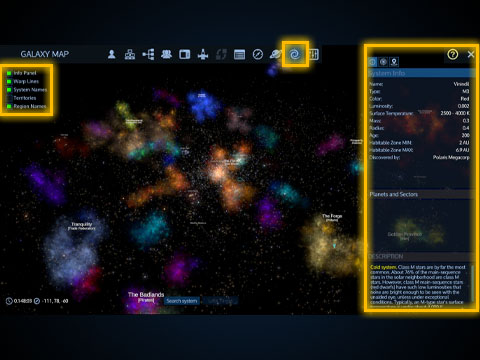
You can access the galaxy map by pressing the galaxy map icon on the top of the screen while in the local map (M), player inventory (Tab), or other windows. There is no hotkey for accessing it directly.
Press the (?) icon in the upper right corner of the galaxy map for an on-screen help window. There are filters on the upper left side of the galaxy map:
Info Panel: Displays the info panel on the right side with useful information. The info panel has 3 tabs to swap between a description of the selected system, a list of visited systems, and a list of your galactic bookmarks. It's recommended to always turn this on so you have access to all the information that you need.
Warp Lines: This shows you a trail of your previous warps. Useful if you want to see where you've been.
System Names: Shows the names and star types of systems near your camera.
Territories: Toggles the faction faction display on or off. Enabling it hides nebula and star colors. Stars will be colored based on their owning faction. Faction territories will display as large colored spheres.
Region Names: Shows region labels throughout the galaxy. Useful for navigation.
United Coalition of the Homeworld (UCH)
The Zirax Empire (ZRX)
Polaris Megacorporation (POL)
The Tal'on Clans (TAL)
Kriel Broodswarm (KRL)
The Legacy (LGC)
The Trade Federation (TRA)
Data Package: Trade Commodities
Data Package: Shield Combat
Data Package: Base Attacks
Data Package: CPU Management
Data Package: Mass and Volume
Data Package: Weapon Effects
Data Package: Supporting Reforged Eden
Ecology of Empyrion
Medical Database
* * * * * * * * Project Eden 2 Info * * * * * * * *
READ FIRST: Getting Started and FAQ
About Reforged Eden
Table of Contents
Galaxy, Sectors, and Planets
The Galaxy
Stars
Territories and Major Regions
Minor Regions
Using the Galaxy Map:
Galaxy Map Overview
Galactic Faction Territory
Galaxy Info Panel
Navigating the Galaxy Map
Search
Planet and Moon Types
Sectors
Resources and Components
Mechanics
Combat
Weapons and Devices
Galaxy Map Overview
You can access the galaxy map by pressing the galaxy map icon on the top of the screen while in the local map (M), player inventory (Tab), or other windows. There is no hotkey for accessing it directly.
Press the (?) icon in the upper right corner of the galaxy map for an on-screen help window. There are filters on the upper left side of the galaxy map:
Info Panel: Displays the info panel on the right side with useful information. The info panel has 3 tabs to swap between a description of the selected system, a list of visited systems, and a list of your galactic bookmarks. It's recommended to always turn this on so you have access to all the information that you need.
Warp Lines: This shows you a trail of your previous warps. Useful if you want to see where you've been.
System Names: Shows the names and star types of systems near your camera.
Territories: Toggles the faction faction display on or off. Enabling it hides nebula and star colors. Stars will be colored based on their owning faction. Faction territories will display as large colored spheres.
Region Names: Shows region labels throughout the galaxy. Useful for navigation.