* * * * * * * * Project Eden 2 Info * * * * * * * *
READ FIRST: Getting Started and FAQ
About Reforged Eden
Table of Contents
Galaxy, Sectors, and Planets
Resources and Components
Mechanics
Player Stats and HUD Elements
Transportation and Propulsion
Transportation Overview:
Running and Swimming
Hoverbike
Hover Vessels (HV)
Small Vessels (SV)
Capital Vessels (CV)
Bases (BA)
Teleporters
Jump Gates
Propulsion Systems:
Ground Repulsor Engines
Hover Engines
Hover Booster
Thrusters
RCS
Prototype Micro Jump Drives
Jump Drives and Warp Drives
Atmospheric Lift
Auto Brake
Pilot Mode
Cruise Control
Ship HUD Elements:
Altitude Indicator
Direction Indicator
Speed Indicator
Docked Indicator
Auto Brake Indicator
Cruise Control Indicator
Passenger Indicator
Mining Mode Indicator
Power Indicator
Fuel Indicator
Oxygen Indicator
Pentaxid Indicator
Power Systems
CPU
Mass and Volume
Logistics
Constructors and Crafting
Food and Farming
Trading
Factions and Reputation
Tech Tree
Blueprint Factory
Combat
Weapons and Devices
Pilot Mode:
Pilot mode is an alternate control scheme for flying ships. It can be toggled with (Left Shift + I).
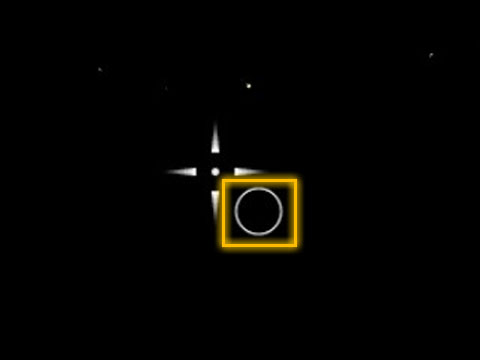
While active, a circle will appear next to your crosshair. You can move this circle using the mouse. See image to the right for an example.
When the circle is near your crosshair your ship will fly straight ahead. Moving the circle towards the edge of the screen will cause your ship to continually turn faster and faster in that direction the further away from the crosshair you move the circle. Using auto level (O) will recenter the circle on your crosshair.
Mounted weapons will still fire at your crosshair, not the circle.
Pilot mode is useful for turning large, slow moving ships without having to move your mouse so much. It can be easy to accidentally hit this hotkey, so consider changing the hotkey for auto brake it in the control panel.
United Coalition of the Homeworld (UCH)
The Zirax Empire (ZRX)
Polaris Megacorporation (POL)
The Tal'on Clans (TAL)
Kriel Broodswarm (KRL)
The Legacy (LGC)
The Trade Federation (TRA)
Data Package: Trade Commodities
Data Package: Shield Combat
Data Package: Base Attacks
Data Package: CPU Management
Data Package: Mass and Volume
Data Package: Weapon Effects
Data Package: Supporting Reforged Eden
Ecology of Empyrion
Medical Database
* * * * * * * * Project Eden 2 Info * * * * * * * *
READ FIRST: Getting Started and FAQ
About Reforged Eden
Table of Contents
Galaxy, Sectors, and Planets
Resources and Components
Mechanics
Player Stats and HUD Elements
Transportation and Propulsion
Transportation Overview:
Running and Swimming
Hoverbike
Hover Vessels (HV)
Small Vessels (SV)
Capital Vessels (CV)
Bases (BA)
Teleporters
Jump Gates
Propulsion Systems:
Ground Repulsor Engines
Hover Engines
Hover Booster
Thrusters
RCS
Prototype Micro Jump Drives
Jump Drives and Warp Drives
Atmospheric Lift
Auto Brake
Pilot Mode
Cruise Control
Ship HUD Elements:
Altitude Indicator
Direction Indicator
Speed Indicator
Docked Indicator
Auto Brake Indicator
Cruise Control Indicator
Passenger Indicator
Mining Mode Indicator
Power Indicator
Fuel Indicator
Oxygen Indicator
Pentaxid Indicator
Power Systems
CPU
Mass and Volume
Logistics
Constructors and Crafting
Food and Farming
Trading
Factions and Reputation
Tech Tree
Blueprint Factory
Combat
Weapons and Devices
Pilot Mode:
Pilot mode is an alternate control scheme for flying ships. It can be toggled with (Left Shift + I).
While active, a circle will appear next to your crosshair. You can move this circle using the mouse. See image to the right for an example.
When the circle is near your crosshair your ship will fly straight ahead. Moving the circle towards the edge of the screen will cause your ship to continually turn faster and faster in that direction the further away from the crosshair you move the circle. Using auto level (O) will recenter the circle on your crosshair.
Mounted weapons will still fire at your crosshair, not the circle.
Pilot mode is useful for turning large, slow moving ships without having to move your mouse so much. It can be easy to accidentally hit this hotkey, so consider changing the hotkey for auto brake it in the control panel.