* * * * * * * * Project Eden 2 Info * * * * * * * *
READ FIRST: Getting Started and FAQ
About Reforged Eden
Table of Contents
Galaxy, Sectors, and Planets
Resources and Components
Mechanics
Player Stats and HUD Elements
Transportation and Propulsion
Power Systems
CPU
Mass and Volume
Logistics
Constructors and Crafting
Food and Farming
Trading
Factions and Reputation
Reputation Overview
Reputation Levels
Gaining Reputation
Losing Reputation
Faction Window
NPC Factions
Player Factions
Lock Codes and Device Access
Player Versus Player
Tech Tree
Blueprint Factory
Combat
Weapons and Devices
Player Factions
In multiplayer, players can form their own factions to share ownership of ships, bases, terrain devices, and reputation. In single player this has no practical purpose.
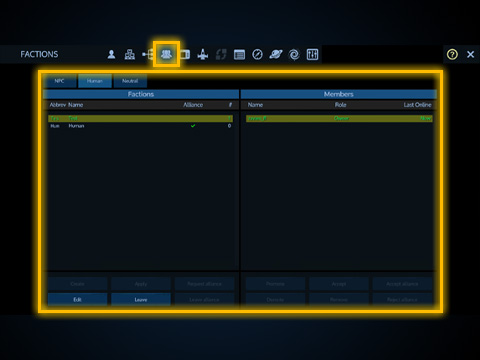
To browse existing player factions, apply to an existing faction, or make your own, select the Human tab of the faction window. Factions will be shown on the left side. Selecting a faction will show more details on the right side, as well as options to apply for membership, manage ranks, and more.
Players can only access and edit structures belonging to them or their faction. Private structures or structures belonging to other factions cannot be accessed. Missions are not shared with a faction. Each player's mission progress is still individual.
Reputation levels are averaged out whenever a new player joins a faction, and any individual player's reputation gains and losses will apply to the faction as a whole. For example if a player gains 100 reputation with Polaris, the entire faction will gain 100 Polaris reputation.
If you are in a faction, structures you spawn and terrain placed devices will still be set to private ownership by default. You can change the ownership of any ship or base that you own from private to faction in the Main tab of the control panel: Terrain placed devices such as auto mining devices and portable constructors can be set to faction access in their menus. Doing so will allow all members of your faction to access and edit that structure or use the device as if it was their own. Ships may only dock to other ships or bases if both structures share the same ownership (either both private, or both faction).
Warning: You cannot change a faction ship back to private, so this is a one way transfer. If you need to change a ship back to private, you will have to remove the core and then place a new core. Before leaving a player faction, make sure you have converted any structures back to private ownership or you will need the assistance of your server admin.
When you first join a multiplayer server you may be automatically placed in a default Human faction. This depends on server settings.
Factions may also join an alliance, but this is typically used for PvP and Reforged Eden 2 is a strictly PvE scenario.
United Coalition of the Homeworld (UCH)
The Zirax Empire (ZRX)
Polaris Megacorporation (POL)
The Tal'on Clans (TAL)
Kriel Broodswarm (KRL)
The Legacy (LGC)
The Trade Federation (TRA)
Data Package: Trade Commodities
Data Package: Shield Combat
Data Package: Base Attacks
Data Package: CPU Management
Data Package: Mass and Volume
Data Package: Weapon Effects
Data Package: Supporting Reforged Eden
Ecology of Empyrion
Medical Database
* * * * * * * * Project Eden 2 Info * * * * * * * *
READ FIRST: Getting Started and FAQ
About Reforged Eden
Table of Contents
Galaxy, Sectors, and Planets
Resources and Components
Mechanics
Player Stats and HUD Elements
Transportation and Propulsion
Power Systems
CPU
Mass and Volume
Logistics
Constructors and Crafting
Food and Farming
Trading
Factions and Reputation
Reputation Overview
Reputation Levels
Gaining Reputation
Losing Reputation
Faction Window
NPC Factions
Player Factions
Lock Codes and Device Access
Player Versus Player
Tech Tree
Blueprint Factory
Combat
Weapons and Devices
Player Factions
In multiplayer, players can form their own factions to share ownership of ships, bases, terrain devices, and reputation. In single player this has no practical purpose.
To browse existing player factions, apply to an existing faction, or make your own, select the Human tab of the faction window. Factions will be shown on the left side. Selecting a faction will show more details on the right side, as well as options to apply for membership, manage ranks, and more.
Players can only access and edit structures belonging to them or their faction. Private structures or structures belonging to other factions cannot be accessed. Missions are not shared with a faction. Each player's mission progress is still individual.
Reputation levels are averaged out whenever a new player joins a faction, and any individual player's reputation gains and losses will apply to the faction as a whole. For example if a player gains 100 reputation with Polaris, the entire faction will gain 100 Polaris reputation.
If you are in a faction, structures you spawn and terrain placed devices will still be set to private ownership by default. You can change the ownership of any ship or base that you own from private to faction in the Main tab of the control panel: Terrain placed devices such as auto mining devices and portable constructors can be set to faction access in their menus. Doing so will allow all members of your faction to access and edit that structure or use the device as if it was their own. Ships may only dock to other ships or bases if both structures share the same ownership (either both private, or both faction).
Warning: You cannot change a faction ship back to private, so this is a one way transfer. If you need to change a ship back to private, you will have to remove the core and then place a new core. Before leaving a player faction, make sure you have converted any structures back to private ownership or you will need the assistance of your server admin.
When you first join a multiplayer server you may be automatically placed in a default Human faction. This depends on server settings.
Factions may also join an alliance, but this is typically used for PvP and Reforged Eden 2 is a strictly PvE scenario.