* * * * * * * * Project Eden 2 Info * * * * * * * *
READ FIRST: Getting Started and FAQ
About Reforged Eden
Table of Contents
Galaxy, Sectors, and Planets
Resources and Components
Mechanics
Combat
Tips and Tricks
Armor
Handheld Weapons
Status Effects and Medical
Enemies
POIs
Shields
Mounted Weapons and Turrets
Mounted Weapons Overview
Turret Overview
Turret Firing Angles
Turret Targeting Settings
Weapon Limits and Tiers
Ammunition
Base Attacks and Reinforcements
Insignias and Bounty Hunting
Weapons and Devices
Turret Targeting Settings:
The targets that turrets will fire at can be configured on a per-turret or per-group basis.
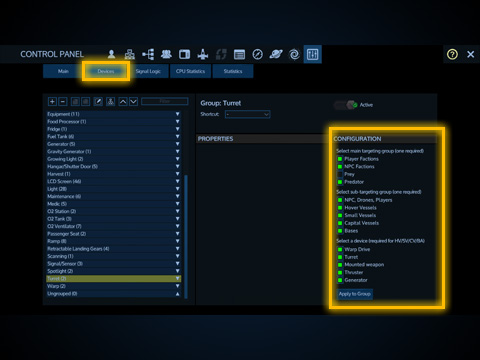
To set your turret's targeting parameters, open the control panel under the Devices tab and select a turret. It is important to properly configure your turret targeting so turrets fire at appropriate targets to be most effective.
To apply targeting to the entire group, select the device group, setup your targeting options, then hit the Apply to Group button. If a checkbox is marked in orange it means some of the turrets have it enabled while some do not.
Turrets will never fire on NPC factions that are neutral standing or above. Turrets will fire on valid interior devices even if they are buried inside the target structure.
Both the main targeting group and sub-targeting group conditions must be met for a target to be considered valid. For example marking NPCs, Drones, Players will not fire on predator wildlife unless you also checked Predator. If target is an enemy structure, the Device Targeting setting must also match.
Main targeting group:
Player Factions: Players that are not in your faction or alliance while in a PvP enabled playfield. Since Reforged Eden 2 is a PvE scenario it is best to leave this option disabled.
NPC Factions: Hostile or hated NPC factions. NPC Factions include Polaris, Zirax, Alien, Warlord, etc. Will not target factions neutral or above.
Prey: Prey wildlife found on planets. Also some rich resource asteroids.
Predator: Predator wildlife found on planets.
Sub-targeting group:
NPCs, Drones, Players: Any NPC or drone or player. For example, wildlife, troops, space drones, etc. Good to set for minigun turrets and sentry turrets.
Hover Vessels, Small Vessels, Capital Vessels, Bases: Any structure that also matches both the main targeting group and device targeting.
Device Targeting:
Warp Drive: This is the warp drive in a small or capital vessel. This also targets rich asteroids so it's recommended to leave this unchecked.
Turret: Any main turret. Sentry turrets and tool turrets are ignored.
Mounted Weapon: Fixed vessel mounted weapons. Since NPC factions cannot fire these weapons it's recommended to leave this option disabled.
Thruster: The thrusters of a ship.
Generator: The generators of a ship or base. Solar capacitors and RTGs are ignored.
United Coalition of the Homeworld (UCH)
The Zirax Empire (ZRX)
Polaris Megacorporation (POL)
The Tal'on Clans (TAL)
Kriel Broodswarm (KRL)
The Legacy (LGC)
The Trade Federation (TRA)
Data Package: Trade Commodities
Data Package: Shield Combat
Data Package: Base Attacks
Data Package: CPU Management
Data Package: Mass and Volume
Data Package: Weapon Effects
Data Package: Supporting Reforged Eden
Ecology of Empyrion
Medical Database
* * * * * * * * Project Eden 2 Info * * * * * * * *
READ FIRST: Getting Started and FAQ
About Reforged Eden
Table of Contents
Galaxy, Sectors, and Planets
Resources and Components
Mechanics
Combat
Tips and Tricks
Armor
Handheld Weapons
Status Effects and Medical
Enemies
POIs
Shields
Mounted Weapons and Turrets
Mounted Weapons Overview
Turret Overview
Turret Firing Angles
Turret Targeting Settings
Weapon Limits and Tiers
Ammunition
Base Attacks and Reinforcements
Insignias and Bounty Hunting
Weapons and Devices
Turret Targeting Settings:
The targets that turrets will fire at can be configured on a per-turret or per-group basis.
To set your turret's targeting parameters, open the control panel under the Devices tab and select a turret. It is important to properly configure your turret targeting so turrets fire at appropriate targets to be most effective.
To apply targeting to the entire group, select the device group, setup your targeting options, then hit the Apply to Group button. If a checkbox is marked in orange it means some of the turrets have it enabled while some do not.
Turrets will never fire on NPC factions that are neutral standing or above. Turrets will fire on valid interior devices even if they are buried inside the target structure.
Both the main targeting group and sub-targeting group conditions must be met for a target to be considered valid. For example marking NPCs, Drones, Players will not fire on predator wildlife unless you also checked Predator. If target is an enemy structure, the Device Targeting setting must also match.
Main targeting group:
Player Factions: Players that are not in your faction or alliance while in a PvP enabled playfield. Since Reforged Eden 2 is a PvE scenario it is best to leave this option disabled.
NPC Factions: Hostile or hated NPC factions. NPC Factions include Polaris, Zirax, Alien, Warlord, etc. Will not target factions neutral or above.
Prey: Prey wildlife found on planets. Also some rich resource asteroids.
Predator: Predator wildlife found on planets.
Sub-targeting group:
NPCs, Drones, Players: Any NPC or drone or player. For example, wildlife, troops, space drones, etc. Good to set for minigun turrets and sentry turrets.
Hover Vessels, Small Vessels, Capital Vessels, Bases: Any structure that also matches both the main targeting group and device targeting.
Device Targeting:
Warp Drive: This is the warp drive in a small or capital vessel. This also targets rich asteroids so it's recommended to leave this unchecked.
Turret: Any main turret. Sentry turrets and tool turrets are ignored.
Mounted Weapon: Fixed vessel mounted weapons. Since NPC factions cannot fire these weapons it's recommended to leave this option disabled.
Thruster: The thrusters of a ship.
Generator: The generators of a ship or base. Solar capacitors and RTGs are ignored.